



Danh mục sản phẩm
itsme
24/09/2026

Dutch players searching for a fast, trustworthy way to experience slots, table games and live dealer tables on a smartphone or tablet will discover that the SlotsPalace Casino app delivers a polished mobile experience right from its official website https://slotpalaces.gr/nl-nl/app/. As opposed to browsing through a mobile browser, the dedicated application keeps a small shell on the device while maintaining full access to the game library, cashier and account settings. The operator supplies the download only through its own domain, guaranteeing that every installation stems from a validated source without the risks associated with third‑party marketplaces. For citizens of the Netherlands, downloading the app is easy once a few device‑specific steps are understood. This article describes every stage of the process, from verifying compatibility and locating the correct page to completing the installation and adjusting security permissions. The guidance that follows is grounded in the real technical requirements of contemporary iOS and Android handsets and shows the actual flow a user will come across on the official SlotsPalace Casino site.
The cashier section inside the app offers the same capabilities as the desktop version, tailored for a smaller screen. A player can deposit funds using a variety of payment methods commonly available in the Netherlands, such as iDEAL, credit and debit cards, e‑wallets and prepaid vouchers. Tapping a deposit method launches a secure inline form that never sends to an external browser, maintaining the entire transaction within the app’s encrypted session. After the payment provider approves the transfer, the balance refreshes in real time and a confirmation receipt is recorded in the transaction history. Minimum and maximum deposit limits, as well as any processing fees, are clearly displayed before the amount is confirmed, letting the player make an informed decision.
Withdrawal requests follow a similar path but include the mandatory identity verification steps required by the operator’s licensing conditions. The app prompts the user to upload documents through a camera capture widget that automatically adjusts and rotates images of a passport, ID card or recent utility bill. The verification team checks submissions during business hours, and the player can monitor the status inside the “Verification” tab without requiring to email support separately. Once the account is confirmed, withdrawal options show according to the method used for depositing; e‑wallet payouts are typically processed within a few hours, while bank transfers may take one to three working days. The whole cashier flow is secured by SSL pinning, which stops man‑in‑the‑middle attacks even on public Wi‑Fi networks.
Android users must follow a sequence that commences on the official download page and proceeds inside the device’s settings panel. First, click the Android tile to initiate fetching the .apk file. Modern versions of Chrome will present a warning that the file type may affect the device; this is a standard alert for any software obtained outside Google Play and can be ignored by selecting “Download anyway”. The file, typically named something like SlotsPalace_v4.2.1.apk, will appear in the Downloads folder once the transfer finishes. At this stage, the user should not seek to open it immediately, because a security gate must be adjusted first.
Navigate to Settings > Apps & notifications > Special app access > Install unknown apps (the exact path may change slightly across Android skins). Identify the browser or file manager that will be used to start the installer and toggle the “Allow from this source” switch to the on position. Return to the Downloads folder, press the .apk file, and approve the installation when prompted. The package installer will parse the file and, within a minute, display an “App installed” notification with an option to launch it. After the first launch, the app will require permissions for storage, phone status and notifications; granting storage access lets the app save game assets efficiently, while phone status is used only to retrieve device hardware identifiers for fraud prevention. Once initialised, the home screen icon is available for everyday use.
Accessing the proper page on the provider’s website is the initial practical step and must be done from the smartphone on which the app will be installed. Launching the SlotsPalace Casino home page in a mobile browser such as Chrome, Safari or Samsung Internet automatically triggers a responsive detection script. The site reads the user agent string and, upon detecting a matching smartphone or tablet, places a constant app banner close to the top of the viewport or inside the main navigation menu. Tapping this banner leads directly to the Netherlands‑specific app landing page, which uses the path /nl‑nl/app/ and offers two separate download tiles: one for Android and one for iOS. The Dutch language variant guarantees that all instructions and compliance notices are tailored to local regulations.
Users who cannot see the banner straight away can scroll to the website footer, where a link titled “Mobile App” or “Download” is consistently placed across all regional versions. It is essential to check that the browser address bar indicates the genuine domain slotpalaces.gr and that the connection is secured with a valid TLS certificate. No third‑party app store, APK aggregator or QR code published on a social media page should be used as an alternative route, because those files cannot be guaranteed to be unaltered. When on the official page, the player will see version numbers and a last‑updated date, which confirm that the current build is regularly updated by the operator’s development team.
Absolutely, obtaining the app through the official page incurs no cost. The provider does not impose any cost for the installer or for creating an account. Real‑money play requires a deposit, but the application itself is installable, started and explored in demonstration mode without any financial obligation.
Not at all, the same credentials are valid across the desktop site, mobile web browser and app. Should a player already possess an account at SlotsPalace Casino, accessing through the app reinstates the full balance, bonus status and gaming history. Fresh players are able to register directly in the app, and the registration flow is the same as the one on the website.
On devices running Android 8.0 or later, the platform blocks direct APK installs on a per‑app basis. Once the file is downloaded, the player must open Settings, search for “Install unknown apps”, pick the browser or file manager that will execute the install, and toggle the setting. On older versions (5.0 to 7.1), a global “Unknown sources” switch can be found under Security settings. If the “Install” button remains greyed out, briefly turning off screen overlay apps including blue‑light filters or chat heads typically fixes the problem. Restarting the gadget after changing the permission can also help the installer recognise the change.
Definitely. The interface is designed to scale over various screen sizes, and tablet owners enjoy a two-pane layout within the game lobby where categories are visible alongside the thumbnails. Active casino tables with an iPad Pro employ the full screen area, providing an experience similar to the PC version.
Android users receive an in‑app notification whenever a new APK is available. Clicking the alert directs them to rtl.nl the official download site, where the new file can be downloaded and installed over the existing app without losing configurations or saved preferences. iOS users need no manual updates because the web‑based app loads the latest build automatically whenever it loads.
Before attempting to download, a player should check that the device meets the required specifications that the SlotsPalace Casino app requires. For Android users, the software demands operating system edition 5.0 (Lollipop) or higher, which covers the overwhelming majority of handsets launched since 2015. bekijk de resultaten The installer package is optimised for ARM and ARM64 architectures, so it works flawlessly on chipsets from MediaTek, Qualcomm Snapdragon and Samsung Exynos lines. Internal memory must have at least 150 MB of free storage to hold the app file and its first data caches, though game assets are downloaded on request and may require additional temporary storage. A display resolution of 720×1280 pixels or higher is recommended to avoid cutting of real-time dealer tables, but the layout also conforms elegantly to smaller displays.
Apple handset owners will need an iPhone or iPad operating iOS 11.0 or newer. This covers every version from the iPhone 5s and iPad Air forward, though devices with 2 GB of RAM or greater provide a noticeably smoother live casino feed. The iOS version of the app is delivered through a web‑based installation profile that creates a main screen shortcut with full‑screen capabilities and built-in gesture support; it does not take up a conventional App Store listing due to platform restrictions on real-money gambling apps. No matter the OS, a steady internet connection of at least 4 Mbps is the practical minimum for seamless live dealer streaming. The list below outlines the main requirements:
Apple’s ecosystem imposes a different delivery model, which SlotsPalace Casino manages through a progressive web application bundled with an installation profile. From the same official download page, an iOS user selects the Apple‑specific button, which triggers a guided overlay explaining the three‑tap installation process. First, the system delivers a configuration profile that must be approved in Settings > General > VPN & Device Management; this profile is signed with an enterprise certificate and is verified by the device against Apple’s servers. Accepting it does not compromise the phone’s warranty or security model because the profile can be removed at any time and only adds a home screen bookmark with enhanced capabilities.
After the profile installs, the SlotsPalace icon is visible on the home screen with the same visual weight as any App Store application. Opening it launches a full‑screen Safari view controller that hides the URL bar, giving the illusion of a native app while still running WebKit. The operator leverages this approach to stay compliant with Apple’s App Store Review Guidelines for real‑money gambling, which restrict true native casino apps to a handful of jurisdictions. Dutch players take advantage of the same account synchronisation, Touch ID or Face ID log‑in, and push notification support they would find on Android. Updates are delivered silently because the core assets are fetched from the web each time; no manual version upgrades are required.
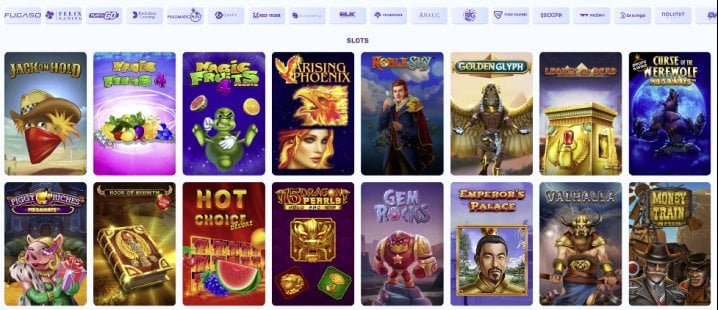
Upon logging in, the user encounters a lobby built with a bottom‑anchored navigation bar that holds the cashier, game lobby, promotions and account hub within thumb reach. The game grid renders progressively, displaying slot thumbnails in a two‑column arrangement that expands cleanly on larger screens. A search field with predictive text enables a player to locate a specific title by typing only a few characters, and a row of category chips filters the library between slots, live casino, table games and newly added releases. This layout reduces endless scrolling and echoes the ergonomic considerations found in popular consumer apps, which renders it natural even to someone using a casino app for the first time.
Beyond the game selection, the app includes a set of responsible gaming tools accessible from a dedicated icon in the top‑right corner. Deposit limits, session reminders and reality checks can be set or changed without navigating to a separate web page, and the cool‑off and self‑exclusion options connect directly to the operator’s safer gambling framework. The in‑app notification centre collects bonus offers, tournament invitations and transaction confirmations, each with a time stamp and a deep link to the relevant screen. Live chat support is integrated so that a conversation can be initiated without leaving the game interface. The following list highlights the core in‑app elements:
Putting in the native application delivers tangible advantages over loading the casino in a mobile browser, beginning with resource management. A browser needs to re‑render every menu, game thumbnail and promotional banner on each visit, whilst the app caches interface elements so that navigation feels instantaneous on an average 4G connection. Push notifications, once granted, enable the casino to alert a player concerning newly released slot titles, limited‑time promotions or pending withdrawal confirmations independent of email. As the app icon sits directly on the home screen, launching a gaming session needs one tap rather than typing a URL or locating a bookmark. These small efficiencies add up during regular use and reduce the likelihood of accidental tab closures mid‑game.

An additional layer of benefit concerns how the app interacts with the device’s hardware. SlotsPalace Casino crafted the application to recognise screen resolution and touch responsiveness automatically, so buttons and bet selectors scale correctly on everything from compact phones to large tablets. Biometric authentication, where supported, is able to be enabled for log‑in, letting players use a fingerprint or facial scan instead of typing a password each time. Furthermore, the app maintains a persistent, encrypted connection to the gaming servers, potentially yielding fewer session timeouts when switching between Wi‑Fi and mobile data. Together these improvements render the app feel purpose‑built instead of a repackaged website.
SlotsPalace Casino designed the software to balance visual quality with conservative data consumption. On average, 30 minutes of slot play requires between 15 MB and 25 MB, while a live dealer table streaming in standard definition requires roughly 120 MB in the same period. The app allows the player to choose video quality manually inside the settings pane: “Data Saver” restricts streams to 480p, “Balanced” presets to 720p and “High” unlocks 1080p where the connection permits. These presets give players direct control over their monthly data allowance and are especially useful when roaming or tethered to a capped plan. Asset caching further reduces repeated downloads of game graphics, and the app regularly clears outdated files to hold the storage footprint under 300 MB.
On the security side, the application uses certificate pinning at the networking layer, ensuring it will reject to communicate with any server that cannot provide the specific TLS certificate issued to the operator’s infrastructure. All login credentials are secured client‑side before transmission, and sensitive operations such as changing a password or adding a payment method demand re‑authentication. The codebase itself is scrambled to make reverse engineering difficult, and integrity checks run at app launch to identify if the installation has been tampered with. Combined with the routine external security audits referenced in the operator’s compliance reports, these measures form a defensive perimeter that corresponds with the standards demanded of a licensed online casino serving Dutch players.